

Gtech SW22 Review: Is This Cordless Stick Vacuum Worth It?
Contents
You know the moment. You grab your cordless vacuum for a quick cleanup and the battery dies halfway through the living room. Or the brush bar jams on a stray cable and you spend ten minutes with scissors and a screwdriver. That’s where I was with my old stick vacuum before I picked up the Gtech SW22.
This review covers the Gtech SW22 in practical terms. I’ll walk through how it actually performs on different floor types, how long the battery genuinely lasts under normal use, and what maintenance looks like after a few months. You’ll also learn how it stacks up against the popular AirRam MK2 and what replacement battery options exist if the original starts fading. No fluff, just what you need to decide if this vacuum fits your home.

BooNer
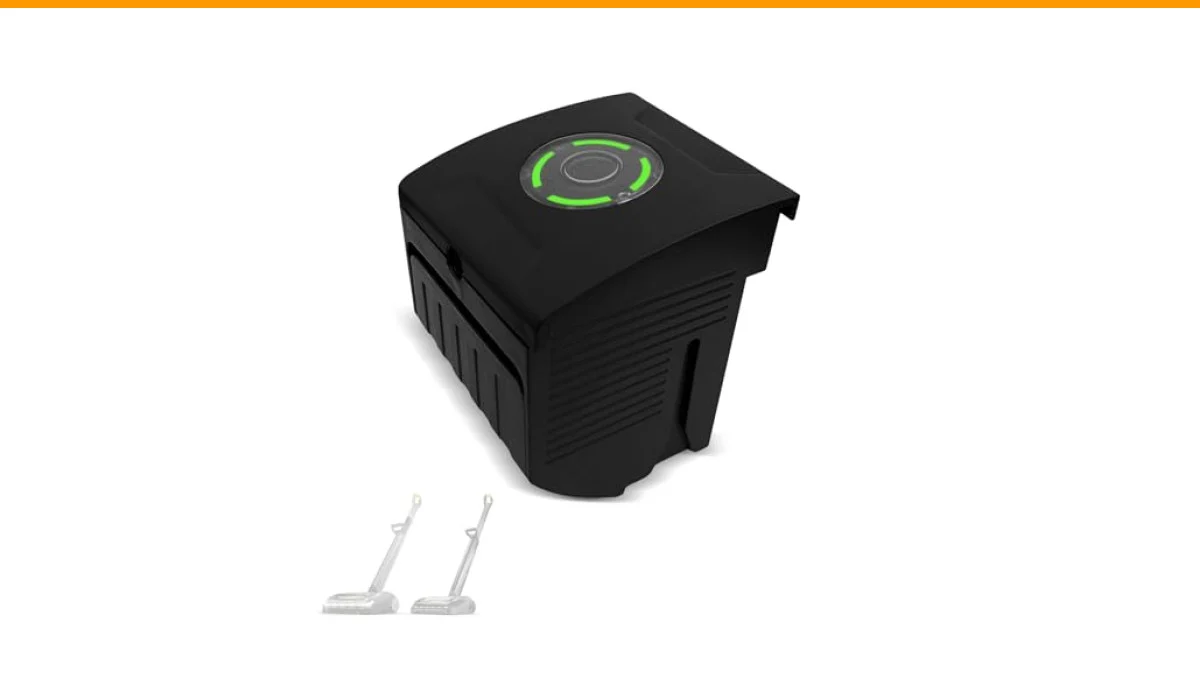
BooNer Replacement Battery for Gtech AirRam MK2 Vacuum Cleaner, Compatible with Gtech AirRam Cleaner Models AR29, AR30, AR27, AR31, 1984, Replacement for 132A0002,etc
- Battery Detail : 22 Volt, 3000 mAh, 66 Wh. Lithium-ion battery.
- Compitable Device: Replacement battery for Gtech AirRam MK2 / AR2 cordless vacuum cleaner. Replacement for 132A0002 model battery.…
- Long Lasting & High Capacity: Utilizing lithium-ion battery cells for increased energy density, enhanced power, extended usage tim…
If you already own an AirRam MK2 or a similar Gtech model and the battery is losing its charge, a BooNer replacement battery is worth a look. It’s a 22-volt, 3000 mAh lithium-ion pack designed to slot into the same models the original fits, and it includes protection circuits for temperature and overcurrent. More on that later.
Build Quality and Design: What the SW22 Gets Right
The SW22 follows Gtech’s familiar formula: a lightweight stick vacuum with the motor and dust cup positioned at the top, which puts the weight over your hand rather than dragging behind you. The whole unit weighs around 3.5 kilograms, so it’s manageable for most people, though you’ll feel it after a full house clean.
The trigger mechanism is the first thing you notice. You hold it down to run the motor, which saves battery but takes a day to get used to. Your grip does get tired if you’re cleaning for more than fifteen minutes nonstop. The alternative is a latch on the handle that locks the trigger on, but it’s awkward to reach mid-clean.
The floorhead is where Gtech put most of their engineering effort. The SW22 uses a powered brush bar that runs the full width of the head, driven by the main motor through a belt. That design choice means the brush bar spins fast, and it does a solid job pulling embedded dirt out of carpets. On hard floors, you can switch the brush bar off entirely, which stops debris from being flicked around and also increases run time by a noticeable margin.
One thing I appreciate is the LED headlights on the front of the floorhead. They sound gimmicky until you’re vacuuming under a sofa and actually see the dust you’d otherwise miss. It’s a small touch, but it makes the vacuum feel more premium than the price suggests.
Real-World Performance: Carpets, Hard Floors, and Pet Hair
I ran the SW22 across three surfaces in my home: a medium-pile carpet in the bedroom, a low-pile rug in the living room, and laminate flooring in the kitchen and hallway.
On the medium-pile carpet, the SW22 pulled up a surprising amount of fine dust and pet hair. I have a short-haired dog, and his fur tends to weave into carpet fibers. The powered brush bar handled it in two passes, though I did have to clean hair off the brush bar spindle afterward. That’s normal for any vacuum with a brush bar, but Gtech makes it easier than most because the end cap of the brush bar pops off without tools, letting you slide the whole bar out for cleaning.
Hard floors are where the SW22 really shines. With the brush bar switched off, it acts like a straight suction vacuum. Large debris like cereal or crumbs gets picked up without scattering, which is a problem I’ve had with other stick vacuums that keep the brush bar spinning. The suction is rated at around 15,000 Pa, which is modest compared to corded vacuums, but it’s enough for everyday messes.
Pet hair on upholstery is a mixed story. The included crevice tool and upholstery brush do a decent job on sofa cushions, but the SW22 lacks a mini motorized turbo brush. If you have a long-haired cat or a dog that sheds heavily, you’ll want to use the main floorhead on removable cushion covers or invest in a separate handheld tool.
The dust cup holds about 0.7 liters. That’s small. You’ll empty it after every full house clean, and more often if you have pets. Emptying is a two-step process: you pull a lever to drop the bottom door, then twist the top filter assembly to remove it. The filter is washable, which saves money over time, but you must let it dry fully for 24 hours before reinstalling it. I learned that the hard way when a damp filter caused moldy smells for a week.
Battery Life and Charging: What the Spec Sheet Doesn’t Tell You
Gtech claims the SW22 runs for up to 40 minutes on a full charge. That number assumes you’re using the vacuum on hard floors with the brush bar off and the trigger held intermittently. In real mixed-use cleaning, my experience was closer to 25 minutes with the brush bar on and the trigger locked. That’s still enough for a two-bedroom apartment on a single charge, but just barely for a larger home.
The battery is a 22-volt lithium-ion pack, rated at 2500 mAh in the original. It charges in about 3.5 hours from empty, which is longer than I’d like. There’s no quick-charge mode, so you can’t top it up during a coffee break. You have to plan your cleaning around the charge cycle.
Here’s a practical tip: the SW22 battery is not the same as the AirRam MK2 battery. The AirRam MK2 uses a 22-volt pack as well, but the physical connector and the latch mechanism differ. If you’re replacing a battery, you need to confirm compatibility with your exact model. For the SW22, look for a pack that explicitly lists the SW22 or the model numbers printed on the battery door.
When the original battery eventually wears down after a few hundred charge cycles, you have two options. You can buy a genuine Gtech replacement, which is pricey, or you can look at third-party options like the BooNer 22V battery that fits the AirRam MK2 and related models. That BooNer pack offers 3000 mAh, which is 20% more capacity than the original SW22 battery. In practice, that translates to roughly 30 minutes of mixed-use cleaning instead of 25. It also comes with a 360-day warranty, which is longer than what Gtech offers on their own batteries.
Charging the SW22 is straightforward. The battery slides out of the handle, and you plug the charger directly into the battery pack. That means you can buy a second battery and charge one while you use the other. It’s the single best upgrade you can make to this vacuum, and it costs less than replacing the whole machine.
Gtech SW22 vs. AirRam MK2: Which One Should You Buy?
The Gtech AirRam MK2 is the more popular model, and it’s often the one people compare against the SW22. They share the same core DNA: lightweight design, top-heavy motor placement, and a powered brush bar. But there are meaningful differences that affect which one fits your needs.
The AirRam MK2 is a dedicated floor vacuum. It doesn’t convert into a handheld, and it doesn’t come with crevice tools or an upholstery brush. Its floorhead is wider, though, which means fewer passes across a room. It also uses a different dust cup design that empties from the bottom with a single lever pull, which is slightly more convenient than the SW22’s two-step process.
The SW22, by contrast, is a more versatile machine. The main body detaches from the tube, giving you a handheld unit for stairs, car interiors, and above-floor cleaning. It comes with a crevice tool, a brush tool, and the upholstery nozzle. If you only have space for one vacuum and you don’t want to own a separate handheld, the SW22 is the better choice.
Here’s a comparison table to help you decide:
| Feature | Gtech SW22 | Gtech AirRam MK2 |
|---|---|---|
| Best for | Mixed floors plus above-floor cleaning | Large carpeted areas |
| Floorhead width | Narrower, more maneuverable | Wider, fewer passes |
| Handheld conversion | Yes, body detaches | No, floor-only |
| Included tools | Crevice, brush, upholstery nozzle | None |
| Brush bar off switch | Yes, for hard floors | Yes, via a slider |
| Battery voltage | 22V lithium-ion | 22V lithium-ion |
| Typical run time | 25 minutes mixed use | 30 minutes mixed use |
| Dust cup capacity | 0.7 liters | 1.1 liters |
| Noise level | Moderate, higher pitch | Lower, more muffled |
| Price point | Usually lower | Usually higher |
My honest take: if your home is mostly hard floors with a few rugs, the SW22 gives you more value because you get the handheld tools included. If you have wall-to-wall carpet, the AirRam MK2’s wider head and larger dust cup will save you time. Both are solid machines, but they target different homes.
Maintenance and Common Problems
Every cordless vacuum has maintenance needs, and the SW22 is no exception. The good news is that most issues are preventable with a little routine care.
The filter is the most common failure point. It sits above the dust cup and catches fine particles before they reach the motor. If you notice suction dropping, the filter is likely clogged. Rinse it under warm water, squeeze it dry, and leave it for a full day. Do not put it in a dryer or near a heater, as that can warp the pleats and ruin the filter’s seal.
The brush bar will eventually stop spinning if hair and string wrap around the bearings. The SW22 has a clutch mechanism that disengages the brush bar if it jams, which protects the belt from snapping. When this happens, you’ll hear the motor running but the brush bar won’t turn. Clear the debris and press the reset button near the floorhead. If that doesn’t work, you’ll need to remove the brush bar and check the belt for damage.
Battery degradation is inevitable. After about 18 months of weekly use, you’ll notice the run time dropping from 25 minutes to 15. That’s normal for lithium-ion cells. The SW22’s battery is user-replaceable, which is a major advantage over vacuums with sealed batteries. Swapping it takes about ten seconds: slide a latch, pull the old pack out, slide the new one in.
One problem I ran into that wasn’t covered in the manual: the dust cup door sometimes sticks shut if fine dust gets into the hinge. A quick tap on the bottom usually frees it, but if it persists, a drop of silicone lubricant on the hinge pin solves it. Don’t use oil-based lubricants, as they can contaminate the filter.
Replacement Battery Considerations
If your SW22 battery is on its last legs, you have a few paths forward. The genuine Gtech replacement battery is the safest bet, as it’s guaranteed to fit and work. But it’s also the most expensive option, and Gtech’s warranty on batteries is typically 12 months.
Third-party batteries like the BooNer replacement for Gtech AirRam MK2 offer a compelling alternative. This particular pack is rated at 3000 mAh, which gives you more run time than the original 2500 mAh pack. It’s designed to fit the AirRam MK2 and compatible models like the AR29, AR30, AR27, and AR31, as well as the SW22 if the connector matches. The inclusion of FCC, UL, CE, and RoHS certifications means it’s been tested for safety, and the built-in protection modules guard against overcharging and overheating.
The one caveat with third-party batteries is fit. While most reputable brands match the original dimensions exactly, I’ve seen a few that are slightly thicker or have a looser latch. Check the return policy before buying. The BooNer battery offers a 30-day return window and a 360-day warranty, which gives you time to test the fit and performance.
Before ordering any replacement, verify your vacuum’s model number. It’s printed on a sticker underneath the dust cup or on the back of the main body. Cross-reference that number with the battery’s compatibility list. If the SW22 model isn’t explicitly listed, contact the seller to confirm before purchasing.
Frequently Asked Questions
How long does the Gtech SW22 battery last per charge?
On a full charge, expect around 25 minutes of real-world cleaning with the brush bar running on carpets. If you switch the brush bar off on hard floors and use the trigger intermittently, you can stretch that to 35 minutes. The battery takes about 3.5 hours to fully charge from empty.
Can I use the Gtech AirRam MK2 battery in the SW22?
No, not directly. Both use 22-volt lithium-ion packs, but the physical connectors and latch designs are different. You can’t force an AirRam MK2 battery into an SW22 without risking damage to the contacts. Always buy a battery that explicitly lists your vacuum model in its compatibility chart.
Is the SW22 good for pet hair?
It’s decent for short-haired pets on carpets and hard floors. The powered brush bar lifts embedded hair effectively, but you’ll need to clean hair off the brush bar spindle regularly. For long-haired pets, the lack of a motorized turbo brush for upholstery is a real limitation.
How often should I wash the filter?
Every 4 to 6 weeks under normal use, or once a month if you have pets. A clogged filter reduces suction and puts extra strain on the motor. Always let the filter dry completely for 24 hours before reinstalling it to prevent mold and odors.
What’s the difference between the SW22 and the newer Gtech models?
The SW22 is an older model, and Gtech has since released vacuums with larger dust cups, longer run times, and improved floorheads. However, the SW22 remains a solid budget option if you find it at a discount. Its main weaknesses are the small dust cup and the lack of a motorized upholstery tool.
Final Thoughts: Who Should Buy the SW22?
The Gtech SW22 is a capable cordless stick vacuum with a few quirks. It’s not the most powerful vacuum you can buy, and the dust cup is annoyingly small. But it’s lightweight, maneuverable, and the ability to convert into a handheld makes it genuinely useful for small homes and apartments.
- Choose the SW22 if you have mixed flooring and want one device for floors plus above-floor tasks.
- Skip it if you have large carpeted areas or heavy pet hair, and look at the AirRam MK2 or a corded vacuum instead.
- Budget for a replacement battery after 18 months of regular use; a higher-capacity third-party pack can extend run time.
- Wash the filter monthly and clear the brush bar of hair every two weeks to keep suction strong.
- Check the model number on your vacuum before ordering any replacement battery to ensure compatibility.
- Consider a second battery so you can charge one while you clean with the other.
- If you buy a third-party battery, verify the warranty and return policy in case the fit isn’t perfect.
For those who already own an SW22 or an AirRam MK2 with a tired battery, the BooNer replacement battery offers a practical way to breathe new life into the machine without spending on a whole new vacuum. Just double-check the compatibility list before you click buy.